
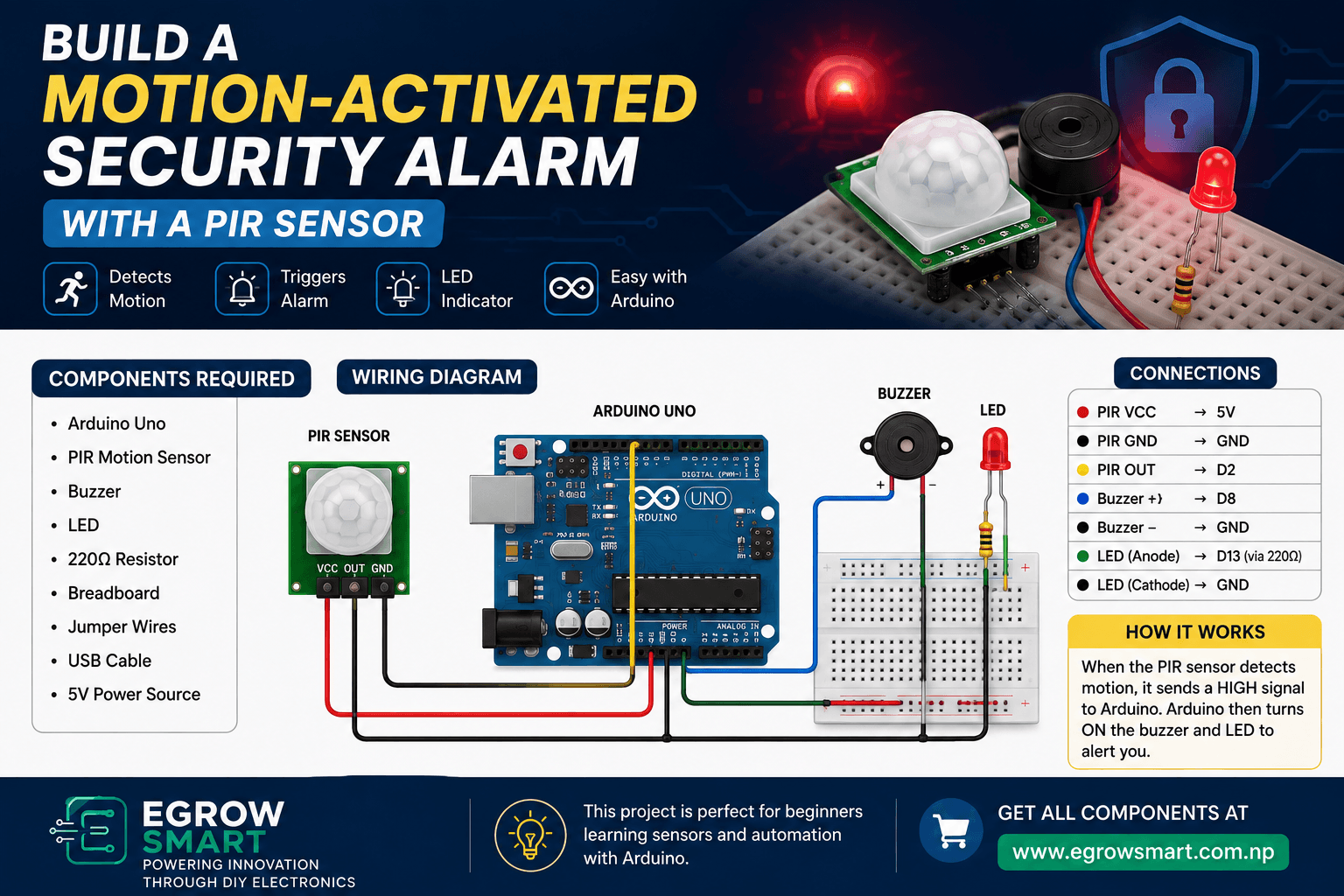
Build a Motion-Activated Security Alarm with a PIR Sensor
Want to build a simple security system using Arduino? In this beginner-friendly project, we'll build a motion-activated security alarm with a PIR sensor.
The system detects movement using a PIR (Passive Infrared) sensor and activates a buzzer and LED when motion is detected.
This is a great project for students, beginners, hobbyists, and anyone learning about Arduino, sensors, and automation.
The project can also be upgraded later with Wi-Fi, an ESP32, an OLED display, or smartphone notifications.
What Is a PIR Sensor?
A PIR sensor is a Passive Infrared sensor used to detect movement caused by changes in infrared radiation.
Humans and animals naturally emit infrared radiation. When a person moves within the sensor's detection area, the PIR sensor detects the change and produces a digital output signal.
A typical PIR sensor has three main connections:
VCC – Power supply
GND – Ground
OUT – Motion detection signal
When motion is detected, the OUT pin changes state, allowing a microcontroller such as Arduino to respond.
How the Motion-Activated Alarm Works
The working principle is simple:
PIR Sensor → Arduino → Buzzer + LED
When the PIR sensor detects movement:
The PIR sensor sends a signal to Arduino.
Arduino reads the sensor output.
Arduino activates the buzzer.
The LED turns ON.
When motion is no longer detected, the alarm turns OFF after the programmed condition is satisfied.
This makes it a simple example of sensor-based automation.
Components Required
For this project, you will need:
Arduino Uno
PIR Motion Sensor
Buzzer
LED
220Ω resistor
Breadboard
Jumper wires
USB cable
5V power source
You can also add an OLED display if you want to show the system status.
Arduino Code
Upload the following code to your Arduino Uno:
const int pirPin = 2;
const int buzzerPin = 8;
const int ledPin = 13;

void setup() {
  pinMode(pirPin, INPUT);
  pinMode(buzzerPin, OUTPUT);
  pinMode(ledPin, OUTPUT);

  Serial.begin(9600);
}

void loop() {

  int motion = digitalRead(pirPin);

  if (motion == HIGH) {
    digitalWrite(buzzerPin, HIGH);
    digitalWrite(ledPin, HIGH);

    Serial.println("Motion Detected!");
  }
  else {
    digitalWrite(buzzerPin, LOW);
    digitalWrite(ledPin, LOW);

    Serial.println("No Motion");
  }

  delay(100);
}
How to Test the Project
Follow these steps:
Step 1: Assemble the Circuit
Connect the PIR sensor, buzzer, LED, resistor, and Arduino according to the circuit connections.
Step 2: Upload the Code
Connect your Arduino to your computer using a USB cable and upload the program using the Arduino IDE.
Step 3: Allow the PIR Sensor to Stabilize
Many PIR modules require a short warm-up period after power-up. During this time, the output may behave differently while the sensor stabilizes.
Step 4: Test Motion Detection
Move your hand or walk in front of the sensor.
When motion is detected:
LED → ON
Buzzer → ON
Serial Monitor → "Motion Detected!"
When the sensor output returns to its inactive state, the alarm turns OFF.
Understanding the Arduino Code
The code uses three important pins:
const int pirPin = 2;
const int buzzerPin = 8;
const int ledPin = 13;
The PIR sensor is connected to digital pin 2, while the buzzer and LED are connected to pins 8 and 13.
Arduino then reads the PIR sensor:
int motion = digitalRead(pirPin);If the sensor output is HIGH:
if (motion == HIGH)Arduino turns on the alarm:
digitalWrite(buzzerPin, HIGH);
digitalWrite(ledPin, HIGH);
This simple logic demonstrates how a microcontroller can convert sensor input into an automatic action.
How to Make the Security Alarm Better
The basic project is a great starting point, but you can make it much more advanced.
1. Add an OLED Display
Use an OLED display to show:
System Armed
Motion Detected
No Motion
Alarm Active
This makes the project more interactive and easier to monitor.
2. Add an ESP32
Replace the Arduino Uno with an ESP32 to add Wi-Fi and Bluetooth capabilities.
The system could then send motion alerts to a web dashboard or other network-connected application.
3. Add a Relay
A relay module can be used to control another suitable electrical load. Always ensure the relay and connected load are properly rated and use appropriate electrical safety practices.
4. Add a Password or Keypad
A keypad can allow the user to:
Arm the alarm
Disarm the alarm
Enter a security code
5. Add a Camera
A camera module can be added to create a more advanced security monitoring system.
For example:
PIR detects motion → Camera captures image → System sends notification
6. Add a Door Sensor
A magnetic reed switch can detect whether a door or window is open.
Combining:
PIR + Door Sensor + Camera + ESP32
can create a much more sophisticated DIY security system.
Project Block Diagram
The basic system can be represented as:
Motion → PIR Sensor → Arduino → Buzzer + LED
For an advanced version:
Motion → PIR Sensor → ESP32 → Wi-Fi → Notification / Dashboard
This makes the project suitable for learning IoT and smart-home automation.
Applications of PIR Motion Sensors
PIR sensors are commonly used for:
Security alarm systems
Automatic lighting
Smart home systems
Energy-saving lighting
Occupancy detection
Automatic doors
Robotics
IoT monitoring systems
Motion-triggered devices
Their simple digital output makes them particularly useful for beginner Arduino projects.
Troubleshooting
PIR sensor is not detecting motion
Check:
VCC connection
GND connection
OUT connection
Sensor orientation
PIR sensitivity settings
Sensor warm-up time
Buzzer stays ON
Check whether the PIR sensor is continuously detecting movement. Also check the module's sensitivity and timing settings.
LED does not turn ON
Check the LED polarity and make sure the resistor is connected correctly.
Arduino keeps resetting
If you're using additional motors, relays, or other high-current devices, avoid powering them directly from the Arduino's 5V pin unless the power requirements are appropriate. Use a suitable external power supply and ensure grounds are connected correctly where required.
Upgrade Your Project With Egrow Smart Components
Ready to build your own Arduino motion-activated security alarm?
You can find the essential electronics components for this project at Egrow Smart, including Arduino boards, PIR sensors, buzzers, LEDs, breadboards, jumper wires, OLED displays, ESP32 boards, and other DIY electronics components.
👉 Explore Electronics Components at Egrow Smart
Frequently Asked Questions
What is a PIR sensor used for?
A PIR sensor is mainly used to detect motion by sensing changes in infrared radiation from people or animals.
Can I build a security alarm without Arduino?
Yes. A PIR sensor can be combined with other electronic circuits to create a basic alarm. However, Arduino makes the project easier to program and customize.
Can ESP32 be used instead of Arduino Uno?
Yes. ESP32 is an excellent choice if you want to add Wi-Fi, Bluetooth, notifications, or other IoT features.
How far can a PIR sensor detect motion?
The detection range depends on the specific PIR module, its lens, sensitivity settings, installation, and environmental conditions. Always check the specifications of your particular sensor.
Can I add a mobile notification?
Yes. With an ESP32 and Wi-Fi connection, the project can be expanded to send motion alerts through an appropriate online service or application.
Conclusion
Building a motion-activated security alarm with a PIR sensor is a simple yet useful Arduino project for learning how sensors and microcontrollers work together.
With just a PIR sensor, Arduino, buzzer, and LED, you can create a basic motion detection system. From there, you can expand the project with an ESP32, OLED display, camera, keypad, door sensor, and IoT connectivity.
This project is a great starting point for students who want to explore Arduino, sensors, home automation, robotics, and IoT.
Build it. Test it. Improve it.
Egrow Smart — Powering Innovation Through DIY Electronics.